2025 Roundup: Web Accessibility Trends and Insights
Accessibility Widgets Don't Fix the Problem: What Our Data Shows – 2025 Conclusions
Let's start with a question. If someone handed you a patch kit and told you it would fix your roof, you'd probably want to know what exactly it patches. Does it seal every leak? Handle all weather? What about the places you haven't checked yet?
That's roughly what's happening in the accessibility space right now, except the stakes involve federal law, a growing wave of website accessibility lawsuits, and millions of users who genuinely cannot access services they need. Businesses are buying widget solutions by the thousands, getting a certificate in return, and moving on. Meanwhile, our testing shows those sites don’t really become more accessible. Not measurably. Not at all.
We audited 9,752 websites last year across healthcare, education, government, and e-commerce. What we found was quite uncomfortable.
The Belief vs. Reality Problem
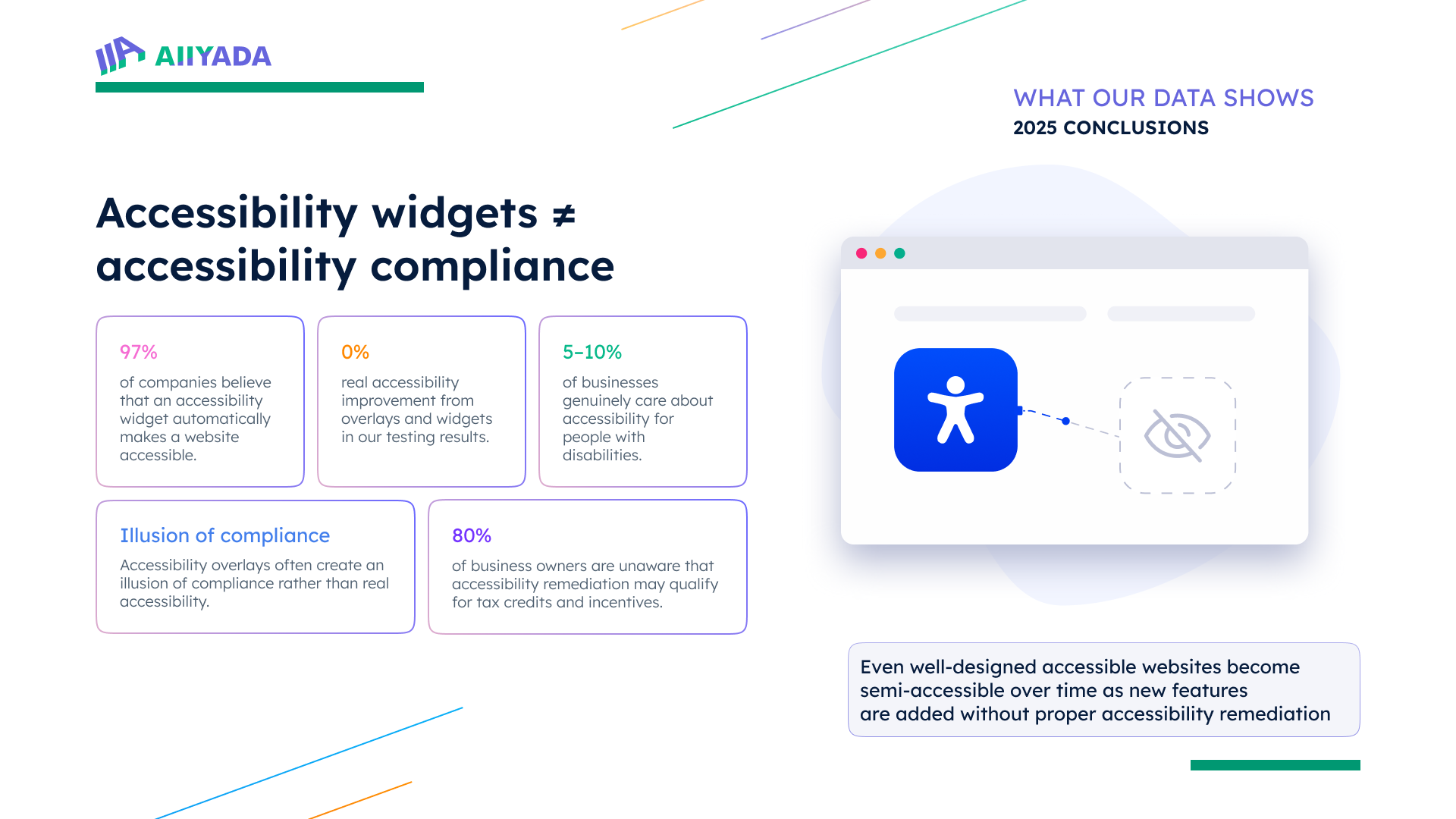
97% of businesses we surveyed believe installing an accessibility widget brings them into compliance. That's not a small misunderstanding. That's a near-universal belief in a solution that, in practice, delivered zero measurable improvement across every tested site where accessibility widgets were the primary approach.
We're not saying these businesses were being careless. Most of them were genuinely worried about getting hit with a web accessibility lawsuit, heard about overlay tools as a fix, and installed one without asking too many questions. That's a reasonable response to an unfamiliar website accessibility compliance risk when someone is selling you a fast, affordable answer. The problem is that the answer doesn't actually work.
Web accessibility compliance under ADA and WCAG accessibility guidelines requires structural changes to how a website is built. These include contrast ratios, keyboard navigation, screen reader compatibility, properly labeled form fields, and video captions. An accessibility overlay sits on top of all of that without touching any of it. It's cosmetic. It may suppress some automated flagging, but the underlying barriers stay in place, and users with disabilities still hit them.
What Almost 10K Sites Truly Showed Us
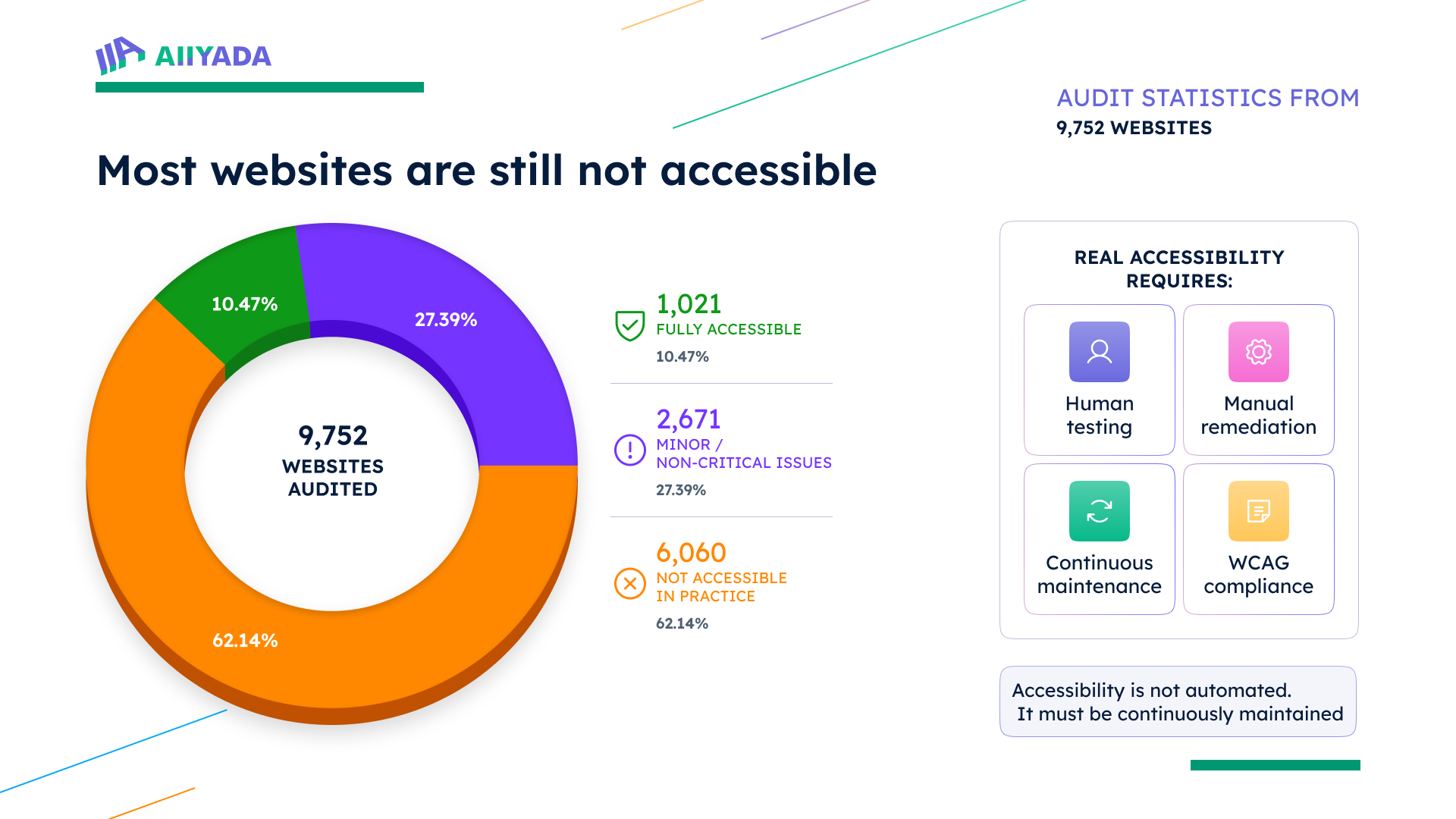
Only 1021 (10.47%) of the sites we audited in 2025 were fully accessible. That means roughly 9 out of 10 sites have real, functional barriers for users who rely on assistive technology. And 6060 (62.14%) of them remained genuinely inaccessible despite having added features, overlays, or some form of remediation attempt over the past year.
Those aren't abandoned sites nobody is managing. A lot of them had widget scripts running. Some had gone through internal checklists. They were trying. But trying with the wrong tools gets you the same result as not trying, at least from the perspective of a user who can't complete a form or navigate a menu with a keyboard.
Website accessibility checkers and automated web accessibility evaluation tools can catch about 30-40% of accessibility issues on a good day. The rest require human judgment. Does this button label make sense to someone using a screen reader? Does this modal trap keyboard focus in a way that leaves someone stuck? Automated tools don't answer those questions well. Web accessibility testing tools are useful, of course, but they're only a starting point for a real audit, not a substitute for one.
What Nobody Talks About: Kind-of-Accessible, Yet Not Enough
Here's a pattern we kept running into during this audit. Sites that had scored decently in previous reviews were showing up as semi-accessible now. And the reason is not that the original work was undone, but that the sites kept evolving, and nobody bothered to run accessibility testing on the new stuff.
A business builds an accessible checkout flow, then adds a live chat widget that traps keyboard focus. They redesign their homepage with a new video banner that has absolutely no captions. They launch a customer portal built by a third-party vendor who has never run a web accessibility evaluation tool over it. Every one of those additions quietly erodes the site’s overall accessibility, and the overlay sitting in the corner catches none of it because it was never designed to.
This is how you end up with a site that looks accessible on paper but isn't in practice. Website accessibility remediation isn't a one-time event. If it's not built into how a site gets updated, the progress you've made deteriorates over time without anyone noticing.
Why the Widget Pitch Works So Well
Here's where you have to give the overlay vendors some credit for understanding their market. Website accessibility lawsuits have been on the rise for years. Businesses without deep technical teams don't always know what ADA website accessibility actually requires. They hear lawsuit, they hear compliance, they hear affordable one-click solution, and they move fast.
Only 5 to 10% of the businesses we talked to were genuinely thinking about accessibility in terms of disabled users and usability. The rest were thinking about litigation. That's not a moral failing, it's just how compliance behavior works when you're scared. You look for the fastest way to reduce your exposure, not necessarily the most thorough one.
The problem is that a website accessibility widget doesn’t actually reduce your legal exposure in any meaningful way. Courts have consistently found that overlays don't resolve the underlying accessibility barriers that form the basis of a web accessibility lawsuit. You still get sued. The widget just costs you extra money before it happens.
Money Left on the Table
One thing that genuinely surprised us in last year's research was how many businesses had no idea that financial incentives exist for accessibility work. About 80% of the business owners weren't aware that the IRS Disabled Access Credit exists, or that Section 179 deductions can apply to accessibility-related expenses. Some states have additional programs on top of that.
None of this makes accessibility free. But it meaningfully changes the cost picture, especially for smaller organizations that have been treating real web accessibility remediation as financially out of reach. If you've been putting off structural fixes because of budget, it's worth asking your accountant what you might qualify for before assuming the answer is nothing. Rules change, and eligibility details matter, so verify rather than rely on any summary, including this one.
What Real Accessibility Looks Like
The sites that scored as fully accessible in our review had something in common. They'd done the structural work. Fixed their HTML at the source, built keyboard navigation into their components, handled contrast at the design level, and established a habit of running website accessibility testing on new features before shipping, not afterward.
Some used automated web accessibility evaluation tools as part of that process. That's fine. Automation is a useful first pass. However, the platforms that achieved true accessibility went beyond automated software, employing hands-on testing with actual assistive technologies – such as keyboard-only navigation, voice control, and screen readers. Because that's the only way to know if something actually works for the people it needs to work for.
Human testing catches what website accessibility checkers miss. It always will. The question is whether you build that into your process or skip it and assume the automated pass was enough.
The Honest Takeaway
Truth is, the data from 2025 is pretty unambiguous but not that bad. It does show an overall accessibility improvement, with people with disabilities experiencing better usability.
For website owners who haven’t taken serious steps towards becoming genuinely accessible, we’ve got a message: widgets don't move the needle. Semi-accessibility is spreading because remediation work isn't being maintained. Businesses are leaving tax incentives unclaimed while complaining that real fixes cost too much. And the threat of a website accessibility lawsuit isn't going away just because you installed a script tag.
None of that means the situation is hopeless. The 10.47% of sites that got this right prove it's entirely possible to do it properly. It just requires treating accessibility as infrastructure rather than insurance, and understanding that the shortcut everyone is selling doesn't actually get you where you need to go.
Start with a real audit. Find your actual barriers. Fix the structural problems. Test with real users. And build a process that catches new issues before they ship, not months later when someone files a complaint.
That's what accessibility compliance actually looks like. It's more work than a widget. It's also the only thing that works.